I've been wanting to do my ESPHome development in Neovim, but the autocompletion and diagnostic capabilities in the dashboard make it hard to leave it. I noticed that it was powered by a VS Code extension. Can I get this running in Neovim?
Initially, I wasn't sure if it was possible at all. While doing some research, I found that Sublime have a working integration with the esphome-vscode extension, where they clearly call it out as a Language Server (LSP). In theory, LSPs shouldn't care what editor is talking to them, and it didn't seem like there was any huge amount of integration code in Sublime's repo, so this got my hopes up.
Installing with mason.nvim
First step was getting the language server running, without worrying about integrating with Neovim. I didn't want to do this manually, as I've been spoiled by mason.nvim automagically setting up every other LSP I have installed (regardless of what language or package manager it uses, or what OS I'm on, and without making a mess either).
I also found out about openvsx which hosts a copy of the ESPHome extension, and I learned that mason.nvim supports openvsx as a source.
I'd previously used a custom repository in mason.nvim, so I figured that was a good idea to try. It took a bit of playing, but basically you want something like this:
/home/aarongorka/.config/mason
└── registry
    └── packages
        └── esphome
            └── package.yaml
It doesn't matter where the mason/ directory is (or what it's called), just the content of the directory.
The content of package.yaml, which I essentially copied from one of the packages in the official Mason registry and replaced all the fields:
---
# yaml-language-server: $schema=https://github.com/mason-org/registry-schema/releases/latest/download/package.schema.json

name: esphome
description: Language server for ESPHome
homepage: https://esphome.io/
licenses: []
languages:
  - YAML
categories:
  - LSP

source:
  id: pkg:openvsx/ESPHome/esphome-vscode@2025.7.0
  download:
    file: ESPHome.esphome-vscode-{{version}}.vsix

schemas:
  lsp: vscode:https://raw.githubusercontent.com/esphome/esphome-vscode/v{{version}}/package.json

bin:
  esphome-lsp: node:extension/server/out/server.js

neovim:
  lspconfig: esphome_lsp
Then, we can tell mason to look for that directory for a custom repository:
{
  "mason-org/mason.nvim",
  ---@class MasonSettings
  opts = {
    registries = {
      "file:~/.config/mason/registry",
      "github:mason-org/mason-registry",
    },
  },
},
Finally, a :MasonUpdate and :MasonInstall esphome and I now had esphome-lsp on my $PATH.
Configuring with vim.lsp
Now normally, you have nvim-lspconfig installed to tell Neovim at least the basics of when and how to start the LSP, but it doesn't look like anyone has done this for the ESPHome LSP yet.
We can do it ourselves though, the same way you'd configure an LSP if you wanted to add extra settings:
vim.lsp.config("esphome_lsp",
  ---@type vim.lsp.Config
  {
    cmd = { 'esphome-lsp', '--stdio' },
    filetypes = { 'yaml' },
    -- `root_dir` ensures that the LSP does not attach to all yaml files
    root_dir = function(bufnr, on_dir)
      local fname = vim.api.nvim_buf_get_name(bufnr)
      if vim.fs.find('.esphome', { path = fname, upward = true })[1] then
        on_dir(require("lspconfig.util").root_pattern('.esphome')(fname))
      end
    end,
    settings = {
      esphome = {
        validator = "dashboard", -- or "local"
        dashboardUri = vim.env.ESPHOME_URL -- I have credentials in my URI ;)
      },
    },
  }
)
Result
And that's it, opening a YAML file in a directory that has a .esphome/ directory in it causes Neovim to start the LSP, and we get all the good stuff:
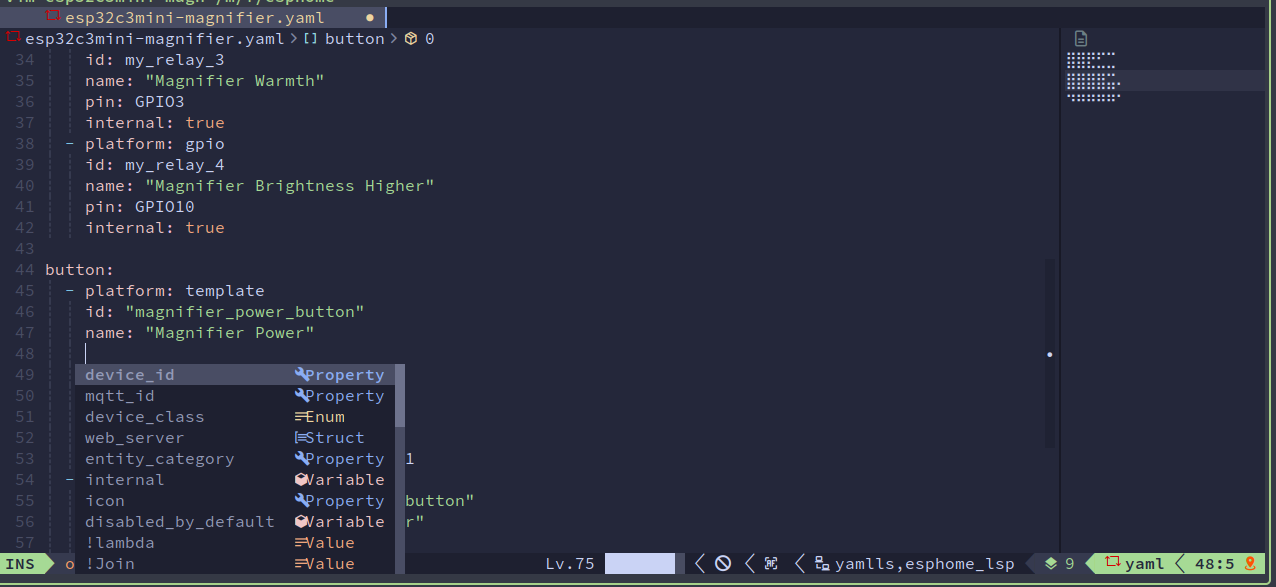
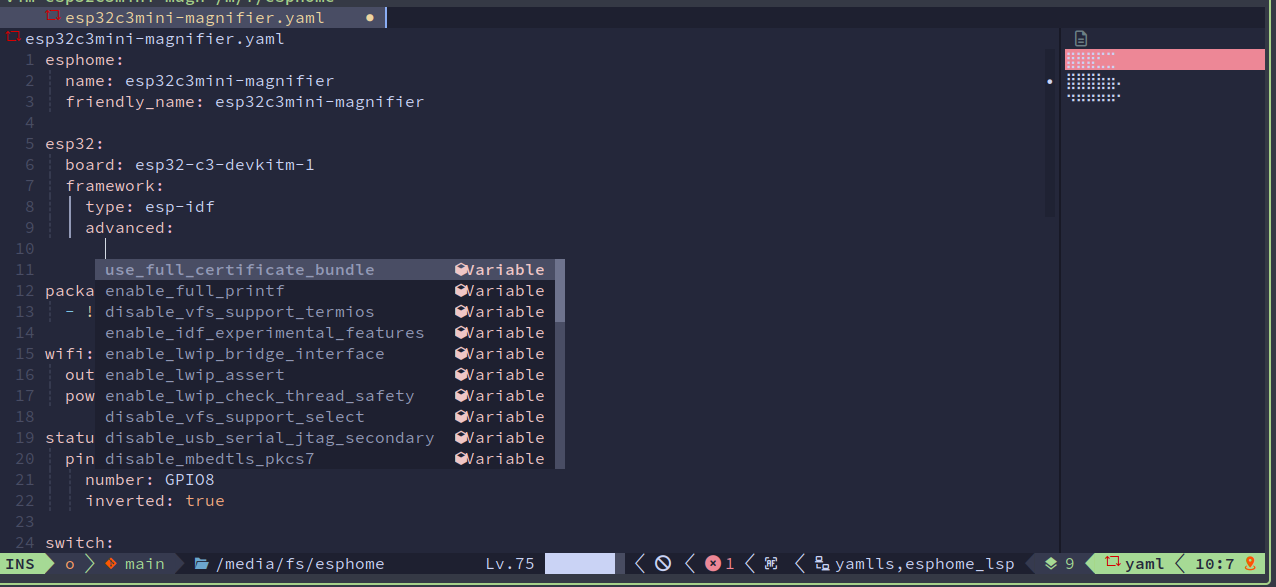
Stuff that would be pretty tedious to look up if we didn't have autocompletion:
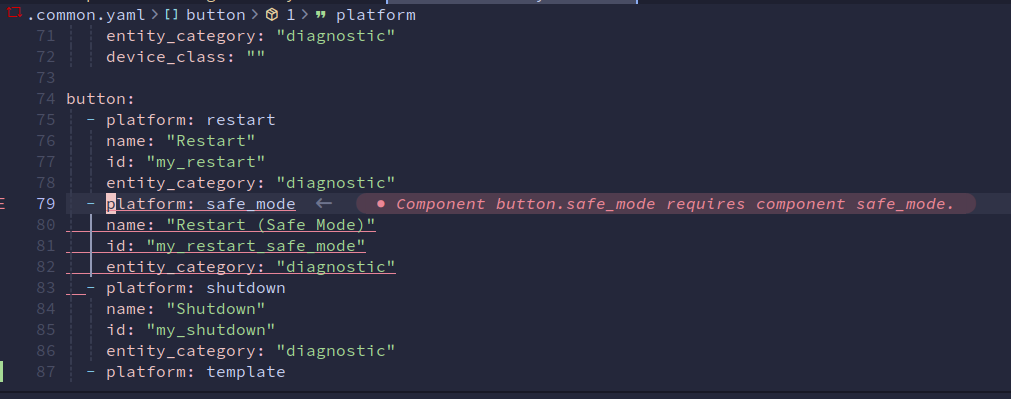
We even get diagnostics:
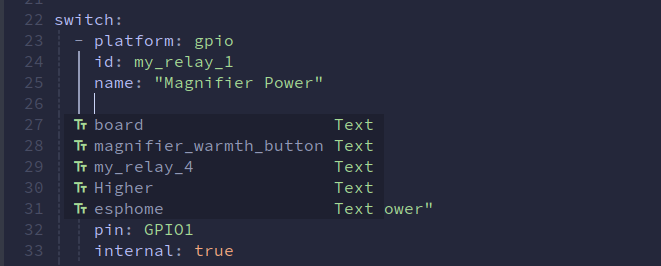
Some things don't work (it seems like there's an issue with switches):
Conclusion
I've shared this as Github hosted mason registry (https://github.com/aarongorka/mason-config) to make it a bit easier to set up. If I can fix up some of the issues, maybe I'll look at seeing if this can be upstreamed.
I wonder what other language servers are out there that haven't been set up in mason.nvim yet?